Automatic reconstitution of rom sets
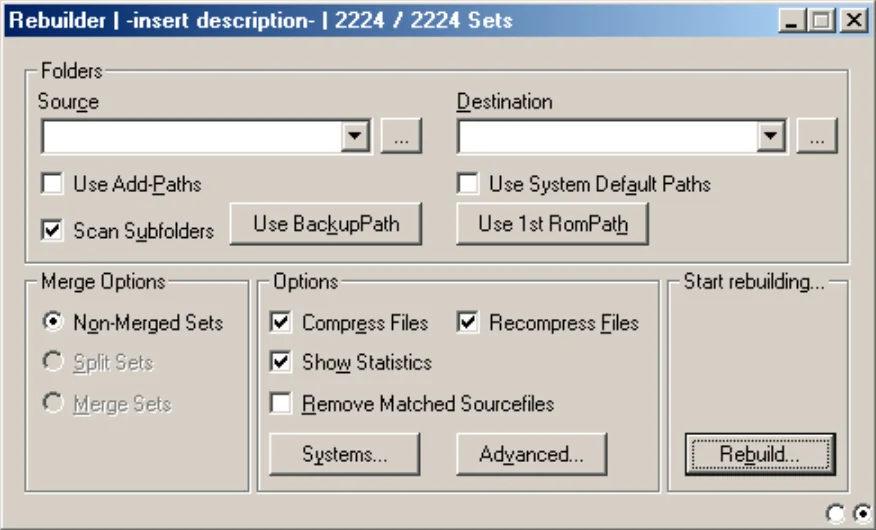
The Rebuilder will allow you to automate the reconstruction of your games.
Note the two radio buttons, at the bottom right to switch from the Scanner to the Rebuilder and vice versa...
It's very practical! It offers incredible comfort!
The drag'n drop of a folder or a file is possible towards the small window of the source folder.
Your drag & drop will be taken into account instead of your memorized source folder.
Regarding the rebuild of samples, it is essential that you consult, in Settings, the paragraph on samples in the Rom-paths section....
Note the two radio buttons, at the bottom right to switch from the Scanner to the Rebuilder and vice versa...
It's very practical! It offers incredible comfort!
The drag'n drop of a folder or a file is possible towards the small window of the source folder.
Your drag & drop will be taken into account instead of your memorized source folder.
Regarding the rebuild of samples, it is essential that you consult, in Settings, the paragraph on samples in the Rom-paths section....
|
For beginners:
Follow the instructions and the path carefully, maybe avoid Systems and Advanced at first... Be very careful with this tool. It will try to warn you as best it can in case of problems. If the Source and destination Paths are misconfigured, you will get a barrage of messages! |
Folders : Path configuration
- Source : Choose the source folder.
- Destination : clrmamepro considers the Rom-paths folder of the loaded profile as the target folder, it is therefore already pre-configured, you can very well change it.
- Use Add-Paths : Predefined source directory.
If you have checked it, it replaces Source but is only available if you have entered it in Settings!
If you have entered Global add-paths it will be scanned at the same time! - Use BackupPath : Use the backup folder.
- Use 1st RomPath : Use the first folder in the Rom-paths list.
- Scan Subfolders : Checked
- Use system default path : Unchecked... Rebuild the games in a folder bearing the name of its bios.
It's a sort by system (bios).
The folders bearing the name of each bios must be created manually in the Rom-paths directory, then do Auto-detect sysdepthpath or enter the paths manually (for example if you have another target directory than Rom-paths).
It is not mandatory that the source directory be previously sorted.
Check the bios that interest you in particular or all of them.
For more information, see Merger for All, None, Invert, Move sets.
Close the window then launch the operation.
Merge Options :
- Non-merged sets.
- Split sets.
- Merged sets.
For more information on Non-merged sets, Split-sets and Merged sets, go see in Merger and in Profiler paragraph Options.
The choice must be of the same type as what you have chosen in the scanner! clrmamepro will warn you otherwise.
Warning, if you change the choice between the Scanner and the Rebuilder, the Rebuilder will act like the Merger.
That's how I do it, or through the Scanner, ^|^ ... I never use the Merger.
Warning: by not going through the Merger, it happens that clrmamepro strangely forgets to create some files, so be very careful. Personally, I always run a scan afterwards.
The choice must be of the same type as what you have chosen in the scanner! clrmamepro will warn you otherwise.
Warning, if you change the choice between the Scanner and the Rebuilder, the Rebuilder will act like the Merger.
That's how I do it, or through the Scanner, ^|^ ... I never use the Merger.
Warning: by not going through the Merger, it happens that clrmamepro strangely forgets to create some files, so be very careful. Personally, I always run a scan afterwards.
Options : Rebuilder settings
- Compress Files : Checked. Rebuild the sets without compressing the files if unchecked and vice versa.
It is now possible to choose between three types of compressors: Winzip, Winrar, 7-Zip.
Simply make your choice in the small dropdown menu before launching a rebuild, the choice is made here, in the Rebuilder.
Some emulators and some sets support this type of compression.
Warning, mame uses and supports only the zip library (Winzip).
To make settings at the compression level or other, go see in the Settings section. - Recompress Files
- Show Statistics
- Remove Matched Sourcefiles : Unchecked. Delete source files. Clrmamepro does not make backup on this option! so BE CAREFUL!
- Systems... : It's the same option as in the Merger. See Merger for more information on this option.
- Advanced :
- Ignore file size : Unchecked. Allow not to verify the size of files.
- Separate BIOS sets : Checked. Each bios will be placed in a different archive.
- Remove empty sourcefolders : Up to you to see. Delete the source folder if it is empty.
- Remove sourcefiles without rebuilding : Unchecked! Delete source files without rebuilding to the destination folder.
- Skip complete folder after XXXX skipped files : Stop a rebuild if "so many" files have been ignored in the same directory. You decide how many represents "so many".
This option allows you to stop the scan of the current directory without stopping the rebuild.
It's not bad, it can be useful, but it's not necessarily logical, nor necessarily useful... - Skip creation when file exists in ROM-Path : Checked. No creation if the file already exists in the RomPaths folder.
Warning, if you want to do a rebuild in a folder different from Rompath, by changing Merged, Split-merged or Merged and you have all the files (if you want the Rebuilder to act like the Merger or simply copy your Rompaths folder with the Rebuilder) -> you will be forced to uncheck this option. Otherwise there will be no action from clrmamepro.
You didn't understand? No it's simple... Try... - Additionally test SHA1/MD5 for matches : Checked. Additional sha1 and md5 tests (performed only if the size and crc match).
- Additionally test SHA1/MD5 for existing destination : Checked. Additional sha1 and md5 tests for all archives present in the destination directory.
- Create logfile : Unchecked. Create a .log file containing all the operations performed by the Rebuilder. This slows down clrmamepro a lot.
- Dest. presting : Create subfolders or rename files with variables.
Everything will be created in your destination folder -> | your variables -> | file name, BackSlash allows you to create a subfolder.
The variables:- %m : Manufacturer of the game.
- %y : Year of manufacture of the game.
- %b : Name of the bios used by the game.
- %s : Name of the source file of the game (driver).
- %a : First character of the name of the game, number or letter.
- %A : First character of the name of the game, number or letter in uppercase.
- %z : First letter of the game in lowercase, games starting with a number are marked 0 - 9
- %Z : First letter of the game in uppercase, games starting with a number are marked 0 - 9
- %d : Description of the game (complete game title).
- %f : Name of the .zip file of the game.
- %c : Name of the parent (name of the cloneof tag).
- %C : Name of the Sample parent (name of the Sampleof tag).
- For games in the manufacturer folders: %m\
- To only add the manufacturer in the name: %m
- You can combine several variables: %m\%y or %m\%m - %y
- Memory used for 'No Recompress' : 128. Amount of RAM used for the reconstruction of non-compressed files.
Check Auto for clrmamepro to manage this option by itself. - Beep when done : It's quite obvious... Your speaker will sing! (the one plugged into your motherboard, and which emits small beeps).
- Backup replaced files : Checked. All files replaced in the destination folder will be copied to backup.
Start rebuilding... :
- Rebuild... : Launch the operation.
- The statistics screen : Once finished, you will have a result screen (see Merger).
It summarizes all the scanned information, all the files you have and those you don't have.